Best Amazon Fire TV Smart TVs 2026
Amazon doesn't just make the Fire TV Stick — it sells full smart TVs with Fire TV built directly in, across three tiers and six sizes. I checked real specs and real buyer complaints for each so you know exactly what you're paying for at every step up the lineup.
Start Here: Which Tier Fits Your Room
2-Series (HD) is for secondary rooms where 4K doesn't matter. 4-Series (4K) is Amazon's mainstream tier — real 4K with HDR10+, the size most people actually buy. Omni QLED adds local dimming and Dolby Vision for a genuinely richer picture, at a real price premium. All three run Fire TV built in — no separate stick needed for any of them.
All 6 Fire TV Smart TVs, Compared
| Model | Size | Price | HDR | Local Dimming | Rating |
|---|---|---|---|---|---|
| 2-Series | 40" | $209.99 | ❌ | ❌ | 4.3★ |
| 4-Series | 43" | $329.99 | HDR10+ | ❌ | 4.2★ |
| 4-Series | 50" | $399.99 | HDR10+ | ❌ | 4.2★ |
| 4-Series | 55" | $459.99 | HDR10+ | ❌ | 4.2★ |
| Omni QLED | 55" | $519.99 | Dolby Vision + HDR10+ | ✅ | 4.0★ |
| Omni QLED | 65" | $749.99 | Dolby Vision + HDR10+ | ✅ | 4.3★ |
Fire TV 2-Series — HD, Entry-Level
Best for: secondary rooms, tightest budget

Amazon Ember 40" 2-Series with Fire TV
The entry-level Fire TV Smart TV — HD resolution, built for secondary rooms.
Check Price on Amazon → Trusted reviews · Free shippingFire TV 4-Series 43" — Mainstream 4K
Best for: smaller spaces wanting real 4K

Amazon Ember 43" 4-Series with Fire TV
The smallest 4K option in the mainstream 4-Series — good picture and sound at an accessible size.
Check Price on Amazon → Trusted reviews · Free shippingFire TV 4-Series 50" — Best Overall
Best for: the typical living room
Amazon Ember 50" 4-Series with Fire TV
The most popular mainstream size in the 4-Series lineup — real 4K at a typical living-room size.
Check Price on Amazon → Trusted reviews · Free shippingFire TV 4-Series 55" — Largest Mainstream
Best for: bigger rooms on a 4-Series budget
Amazon Ember 55" 4-Series with Fire TV
The largest size in the mainstream 4-Series — 4K resolution without stepping up to QLED pricing.
Check Price on Amazon → Trusted reviews · Free shippingFire TV Omni QLED 55" — Best Value QLED
Best for: real picture quality upgrade
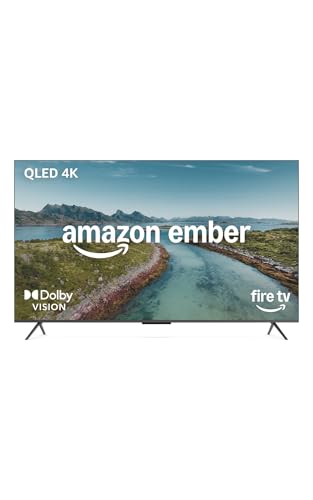
Amazon Ember 55" QLED Series with Fire TV
The flagship QLED tier — local dimming, Dolby Vision, and noticeably richer color than the 4-Series.
Check Price on Amazon → Trusted reviews · Free shippingFire TV Omni QLED 65" — Flagship
Best for: the largest, richest picture available
Amazon Ember 65" QLED Series with Fire TV
The largest, top-of-the-line Fire TV — QLED color, local dimming, and Dolby Vision at the biggest available size.
Check Price on Amazon → Trusted reviews · Free shippingWhich One Should You Actually Buy?
Secondary room, tightest budget: Fire TV 2-Series — no reason to pay for 4K you won't fully appreciate on a smaller screen anyway.
Typical living room, want real 4K: Fire TV 4-Series 50" — the size and tier most buyers actually choose.
Want a genuine picture quality upgrade: Omni QLED 55" — local dimming and Dolby Vision are real, visible improvements over the 4-Series.
Want the biggest, richest screen available: Omni QLED 65" — the flagship of Amazon's own TV lineup.
Frequently Asked Questions
What's the difference between Fire TV 2-Series, 4-Series, and Omni QLED?
The 2-Series is HD resolution only, built for secondary rooms. The 4-Series is Amazon's mainstream 4K tier with HDR10+. The Omni QLED Series adds local dimming and Dolby Vision on top of 4K for noticeably richer color and contrast — it's the flagship tier.
Do these TVs need a separate Fire TV Stick?
No — Fire TV is built directly into every model in this lineup. You get the same interface, apps, and Alexa voice control without plugging in any separate streaming device.
What size Fire TV Smart TV should I buy?
43" and under fits smaller rooms or secondary spaces. 50"-55" is the size most buyers choose for a typical living room. 65" is a real centerpiece size — make sure your room and viewing distance can accommodate it before buying.
Already Have a TV? Just Need Streaming?
👉 See the Fire TV Stick lineup → instead — same Fire TV interface, no new TV required.